
Update Your Name or Address in EPDS Telangana Ration Card
If you need to update your name or address in EPDS Telangana, it’s important to follow the right procedure to ensure that your ration card details are correct. Whether you’ve recently moved, changed your name, or found a mistake, updating your EPDS Telangana ration card will help ensure you continue receiving your benefits without any issues.
When and Why You Need to Update Your Ration Card Information
Your ration card must match your real details for things like:
You should update your name or address in EPDS Telangana if:
Steps to Update Your Name or Address in EPDS Telangana
There are two main methods to update your name or address in EPDS Telangana:
Online via MeeSeva or EPDS Telangana Forms
Telangana provides correction forms that help you update information like address, member names, etc.
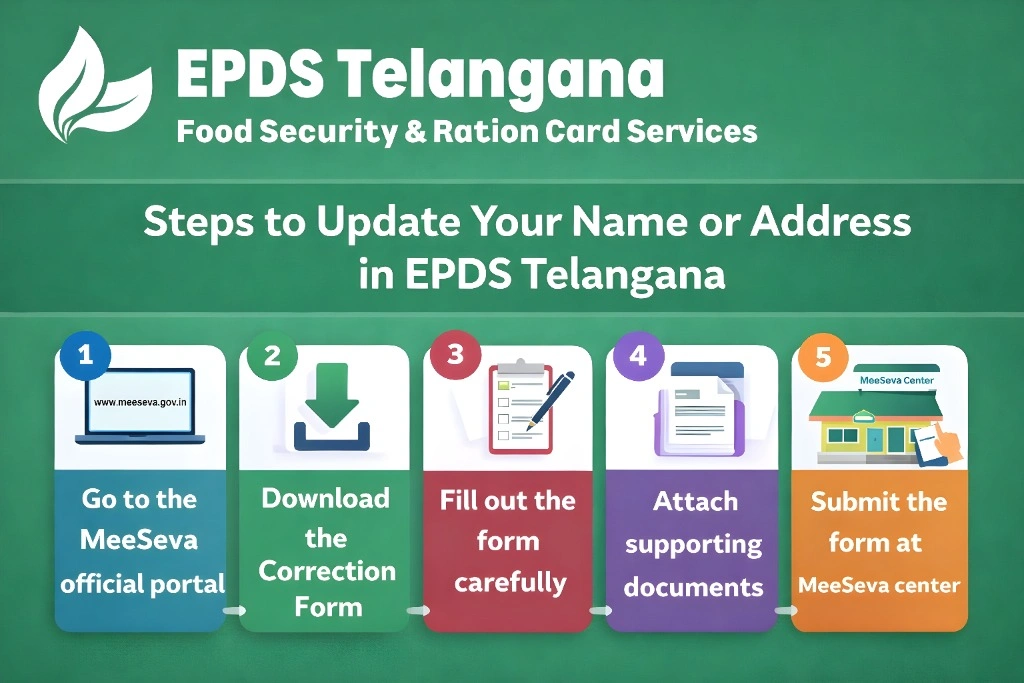
Visit the Telangana MeeSeva services page where all civilian public services are listed, including ration card modification forms.
Look for forms like:
- Ration Card Modifications (EPDS Integration)
- Household Head Modifications
- Corrections in Food Security Card (FSC)
These let you update your name or address in EPDS Telangana.
Write your correct details exactly as per your ID proof documents.
For name change: attach an ID proof showing your correct name
For address change: attach new address proof like Aadhaar, electricity bill, or rent agreement
Visit your nearest MeeSeva centre with your form and self‑attested documents.
MeeSeva staff will give you a reference number. Keep it — you’ll use it to check the status later.
Offline at MeeSeva / Ration Office
If you can’t do it online:
This is the same correction process, but handled in person — helpful if you’re not comfortable with online forms.
Tips to Ensure Your Update Is Approved
Match your documents:
Your name & address on documents must match what you want on the ration card.
Use clear proof:
Aadhaar, voter ID, electricity bill, or rent agreement are strong proofs.
Avoid mistakes:
Double‑check spelling before submitting.
Keep your receipt safe:
Your acknowledgment number is important for tracking your update status.
How to Check Update Status Online
Once you submit your correction:
Common Challenges During the Update Process
Sometimes, you might face issues while updating your ration card. Here are a few common problems and solutions:
Mismatch of documents:
Ensure that the name and address on your documents are consistent.
Incomplete application:
Double‑check all fields before submitting. Missing information can delay the update.
Technical issues:
If the online portal is not working, visit the MeeSeva center to submit the form in person.
How to Update Name or Address After Marriage or Relocation
How to Correct Multiple Errors in a Single Submission
How to Expedite Your Ration Card Update
How to Handle Rejected Updates
The Importance of Keeping Your Ration Card Updated
Keeping your EPDS Telangana ration card details up-to-date is essential for smooth access to public distribution benefits. Incorrect information may lead to delays in receiving government subsidies, food security benefits, or even rejection of your application for future schemes.
Having a valid, accurate ration card also ensures that your family is correctly registered under government welfare programs, and your household enjoys the benefits without interruptions.
Frequently Asked Questions
Final Thoughts
Updating your name or address in EPDS Telangana is important to keep your records accurate and continue getting benefits smoothly. Whether you do it online or offline, follow the steps, use proper documents, and track your application.
Once approved, your ration card will reflect the right information — and your access to food security and government benefits stays uninterrupted.


