
Track FSC Status Using Aadhaar Number on EPDS Telangana
Tracking your FSC (Food Security Card) status online is one of the most common tasks people face when dealing with ration cards in Telangana. The good news is that the EPDS Telangana portal lets you track FSC status using your Aadhaar number—quick and easy.
I’ll guide you through the step-by-step process, making it simple, even if you’re not tech‑savvy. Think of this as a friend explaining it to you.
What Is FSC Search with Aadhaar on EPDS Telangana?
On the EPDS Telangana portal, there’s a feature called “FSC Search” that lets you look up your ration card details or application status using different types of IDs — including your Aadhaar number.
Using Aadhaar makes it easier because many people forget their ration card number but always have their Aadhaar card handy.
Step‑by‑Step: Track FSC Status Using Aadhaar
Here’s how you can track FSC status online using your Aadhaar number:
Go to the EPDS Telangana official portal using your browser.
This is the government’s portal where all ration card services are provided.
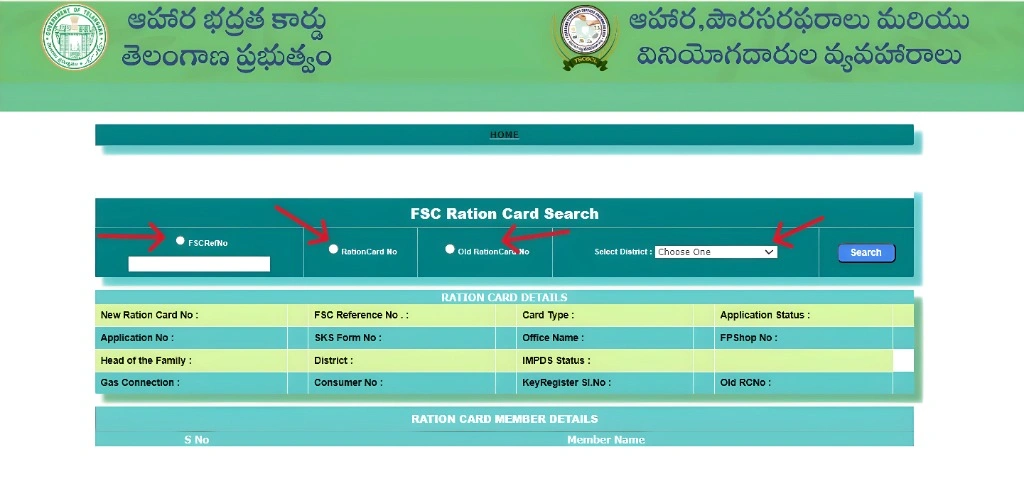
On the homepage, look for the FSC Search or Ration Card Search section. This is usually easy to spot on the menu or main page.
Once you’re on the search page, choose “Search by Aadhaar Number” from the available options.
Type in your 12‑digit Aadhaar number carefully.
Make sure you enter it correctly — no spaces or errors.
Select the district where your ration card is registered. This helps the system find your details faster.
Hit the Search button. The system will locate your ration card details and shw them on the screen.
What Information You Can See
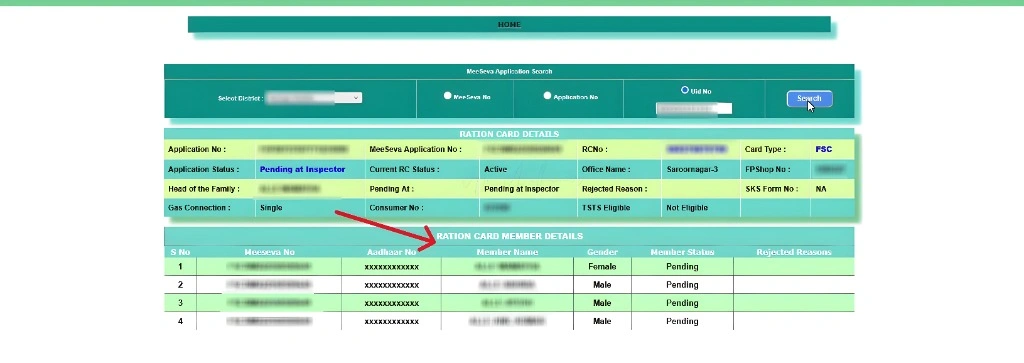
Once the search is complete, you’ll typically see:
This means you don’t have to go anywhere physically just to check if your card is ready — everything is online!
If-Then Table: What to Do Based on Your Search Results
| If | Then |
|---|---|
| You see your ration card details | You can check the status and download your card if approved. |
| Your application is pending | Wait for the approval and track again after some time. |
| You see your application is rejected | Review the reason for rejection and correct the issue to reapply. |
| The search shows “No Results” | Double-check your Aadhaar number and district selection. Try using your ration card reference number or visit a MeeSeva center. |
| You see incorrect details | Use the update option in EPDS Telangana to make corrections. |
Tips If You Don’t See Results
If nothing appears after you search, here are a few things you can try:
Check Aadhaar linkage:
Make sure your Aadhaar is correctly linked to your ration card application.
Try another ID:
If the Aadhaar search doesn’t work, try using your FSC reference number, Meeseva application number, or ration card number.
Visit a MeeSeva center:
If you still can’t find it, a MeeSeva center can help verify your details.
. Common Errors While Tracking FSC with Aadhaar and How to Fix Them
How to Check the Status of Multiple Family Members Using Aadhaar
Mobile-Friendly Tracking: Using EPDS Telangana on Phone
Why Using Aadhaar for Tracking Is Helpful
There are a few reasons why tracking with Aadhaar is convenient:
How to Download Your Ration Card from EPDS Telangana
If you’re looking to download your ration card after approval, the EPDS Telangana portal makes it easy.Once you track FSC status and confirm that your FSC is approved, follow these steps to download your ration card directly to your device:
Frequently Asked Questions
Final Thoughts
Tracking your FSC status using your Aadhaar number on the EPDS Telangana portal is simple, fast, and completely free! No more waiting in long lines or dealing with paperwork—just follow a few easy steps from your computer or phone. You can quickly check your ration card details and application status from the comfort of your home.
If the information doesn’t appear immediately, don’t panic! Double-check your details or try another search method. It’s all online, and you’ll find your FSC status in no time, saving you time and effort. Start tracking your ration card today and experience the convenience of EPDS Telangana!


