
Remove a Family Member from Your EPDS Telangana Ration Card
Sometimes, a family member may need to be removed from your EPDS Telangana ration card due to changes in their status, like moving out, marriage, or even passing away. This guide shows you how to remove a family member from your EPDS Telangana ration card step by step, with practical tips for a smooth process.
Why You Might Need to Remove a Family Member from Your EPDS Telangana
There are several reasons why you might need to remove a family member from your EPDS Telangana ration card, including:
It’s important to keep your ration card up-to-date to ensure that your family details are accurate, preventing issues when applying for benefits.
Step‑by‑Step Guide to Remove a Family Member from Your EPDS Telangana
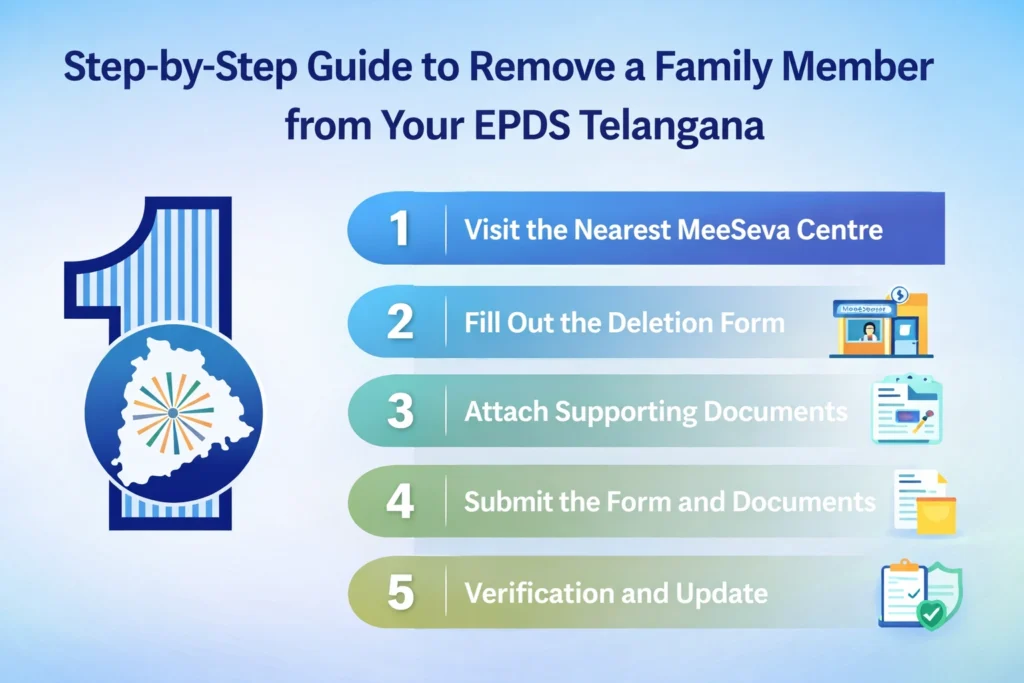
To begin the process, visit your local MeeSeva centre or the nearest ration card office. Inform the officials that you want to remove a family member from your EPDS Telangana ration card. You will likely be given a member deletion form that needs to be filled out.
Tip: Don’t forget to ask for the deletion form if it’s not provided automatically.
Carefully complete the form with:
- Ration card number
- Name of the member you want to remove
- Reason for removal (e.g., death, marriage, relocation)
- Your details as the cardholder
Important: Be sure to accurately spell names, enter the correct dates, and provide valid Aadhaar numbers.
You will need to attach documents that support the removal request:
- Death certificate for deceased members
- Marriage certificate for members who have moved due to marriage
- Address proof or relocation documents if the member has moved away
These documents help the authorities verify your request and ensure the information is correct.
Once the form is completed, submit it along with the supporting documents to the officer at MeeSeva or the ration office. You may also be required to submit a passport-size photo of the member being removed or other details, depending on the circumstances. After submission, you will be given an acknowledgment slip.
Tip: Keep this acknowledgment slip safe, as it will allow you to track the status of your request.
The authorities will verify the details and documents provided. Once everything is verified, your ration card will be updated, and the family member will be removed from the card. This process can take anywhere from a few days to a couple of weeks.
How to Track the Status Later
If your area supports online tracking, you may be able to check the status of your request using the acknowledgment reference number. Keep your acknowledgment slip handy — that number will be required for tracking the request.
Family Member Removal Process
| Step | Details |
|---|---|
| Where to Apply | MeeSeva centre or local ration office |
| Form to Use | Ration Card Member Deletion Form |
| Necessary Documents | Death/Marriage certificate, Aadhaar, Address proof |
| Processing Time | Several days to 1–2 weeks (may vary by office) |
| Tracking | Use reference number to check status |
Tips for Ensuring Hassle-Free Ration Card Updates
What to Do If a Family Member Moves Back After Removal
Sometimes, family members who were removed might need to be added back due to changes in circumstances, like moving back in. You can follow the same FSC Correction Process to re-add them, but you will need to provide updated supporting documents, such as a proof of residence.
Impact of Removing a Family Member on Your Ration Card Limit
When you remove a family member, the household size decreases, which may reduce your ration entitlement. It’s important to keep track of how this change affects the number of beneficiaries and the amount of food grain or other supplies allocated to you.
Common Mistakes to Avoid When Removing a Family Member
- Incorrect Documents: Ensure you have the correct documents such as marriage or death certificates. Missing or incorrect documentation can delay the process.
- Spelling Errors: Double-check the names on the form to ensure there are no spelling errors, as this could cause issues later.
What Happens After the Deletion is Processed?
Once the family member is removed from the ration card, the system will update your card, and your ration benefits will reflect the new household status. The changes may take a few days to process, so check your card regularly to confirm.
Frequently Asked Questions
Final Thoughts
Remove a family member from your EPDS Telangana ration card is a simple yet important process. By visiting your nearest MeeSeva centre or ration office, filling out the necessary forms, and providing the required documents, you can keep your ration card up-to-date. This ensures the correct allocation of benefits and prevents confusion in the future.
Always remember to double-check details, save your acknowledgment slip, and follow up if necessary. By keeping everything accurate, you can ensure that your household benefits are properly managed and that your ration card reflects the current family situation.


